Model quality vs latency: matching benchmarks to constraints
Select up to 4 models to analyze quality, performance, pricing, and benchmarks side-by-side. Effective LLM selection requires matching specific benchmark data to workflow constraints rather than chasing a single overall score.
Dylan Bristot's analysis on whatllm.org demonstrates that a model leading in quality may fail if your primary constraint is latency or hosting costs. The text highlights that the same model can be cheap on one host and expensive on another, making provider comparison necessary before commitment. Users can filter by domains like Code, Math, or Agentic tasks to find the right fit.
This article defines the core attributes driving these differences and explains how provider architectures create performance variances. You will learn to interpret benchmark data across categories like Long Context and Novel Reasoning to avoid costly mismatches. We also outline a strategic approach to align model rankings with your specific operational requirements using the top 10 quality index.
Core LLM Attributes and Performance Metrics Set
Defining LLM Quality Index and Context Windows
Stop compressing performance into one number. The LLM Quality Index compiles discrete scores from coding, reasoning, math, and tool-use benchmarks to reveal capability gaps that global averages hide. A model topping quality charts might crash your workflow if latency or cost constraints dominate your deployment architecture. Enterium platforms parse these granular signals to align model selection with exact operational requirements.
Long context defines the token volume a model processes in a single inference pass, determining its utility for large codebases or document retrieval. Operators targeting retrieval-heavy workflows must verify context limits against their data payloads to avoid truncation errors. The Largest Context Window LLM rankings identify candidates capable of handling extensive input windows without performance degradation. Expanding context windows often increases inference latency and memory costs, creating a cost is higher when input capacity grows at the expense of response speed.
Provider reality matters as much as the model specifications. The same model can be cheap on one host and expensive on another, or fast on one provider and unusable on the next. If a model looks promising based on benchmark data, move to provider comparison before committing resources. This dual-layer analysis prevents costly mismatches between theoretical model capability and production environment constraints.
Applying Agentic Models and Adaptive Reasoning
Agentic models execute multi-step tool chains autonomously, while adaptive reasoning dynamically allocates compute to match problem complexity. These capabilities shift workflow architecture from static prompting to iterative execution loops where the system validates its own outputs. A model leading in quality benchmarks may still fail production if latency constraints prevent the necessary back-and-forth communication.
Operators must distinguish between models designed for single-pass generation and those optimized for iterative tool use. The Best Agentic Models rankings isolate performance in multi-step execution rather than general chat. Conversely, Ollama serves as a runtime environment for self-hosting open-weight variants, allowing teams to test local inference without external API dependencies. This separation enables precise control over data sovereignty and cost structures.
Balancing the depth of reasoning against token consumption limits creates tension. Deep reasoning chains increase accuracy but expand the context window, potentially hitting hard limits on cheaper hosting tiers.
| Capability | Primary Use Case | Deployment Constraint |
|---|---|---|
| Agentic Workflows | Tool use, multi-step tasks | Requires low-latency tool access |
| Adaptive Reasoning | Complex problem solving | High token burn rate |
| Local Inference | Data privacy, low-cost | Hardware memory limits |
Enterium solutions integrate these distinct model behaviors into unified pipelines, routing simple queries to fast endpoints while reserving heavy reasoning models for complex tasks. This hybrid approach maintains operational efficiency without sacrificing analytical depth.
Provider Reality Risks: Latency and Cost Variance
Provider reality dictates that identical models exhibit divergent performance profiles depending on the hosting infrastructure. Mercury 2 currently achieves the highest output throughput at 793 tok/s, demonstrating how specific host optimization impacts agentic loops requiring rapid token generation.
| Metric | High-Performance Host | Standard Host |
|---|---|---|
| Output Speed | 793 tok/s | Variable |
| Primary Use Case | Streaming UIs | Batched Async |
| Cost Driver | Compute Intensity | Token Volume |
Fast inference matters most for streaming chat UIs and agentic loops; for batched async workloads, blended price per 1M tokens is usually the improved axis. Qwen3.7 Max stands as the cheapest model in the top 10 by GPQA Diamond, priced at $1.25 /M tok input, yet this rate applies only to specific provider configurations. A deployment assuming uniform latency across vendors risks time-to-first-token spikes that break real-time user experiences.
Enterium architectures mitigate this variance by routing requests through flexible cost-performance gates rather than static API endpoints. Relying on a single provider's baseline metrics ignores the volatility of shared compute environments where neighbor noise affects consistency. Operators must validate inference latency against their specific SLA before locking into a host, as benchmark averages often mask tail-latency outliers. The correct strategy involves continuous monitoring of live throughput rather than trusting static specification sheets. Select a provider based on verified, current output throughput data mapped to your workload type.
Benchmark Data and Provider Architectures Drive Model Differences
How LiveCodeBench and Terminal-Bench Define Coding Strength
LiveCodeBench and Terminal-Bench isolate execution success from token probability, measuring whether generated code actually runs. LiveCodeBench evaluates solutions against fresh competition problems to prevent training data contamination, while Terminal-Bench requires agents to navigate real shell environments to complete tasks. These mechanics differ sharply from static dataset scoring, which often rewards memorized patterns over functional logic. A model ranking high on general benchmarks may fail completely when forced to execute commands in a live terminal.
| Benchmark | Primary Mechanism | Execution Required |
|---|---|---|
| LiveCodeBench | Fresh problem solving | Yes (Sandbox) |
| Terminal-Bench | Agent task completion | Yes (Shell) |
| Static Datasets | Pattern matching | No |
Relying solely on aggregate quality scores obscures these specific failure modes in production pipelines. Teams building agentic workflows should consult rankings for tool use and multi-step execution, whereas pure code generation tasks benefit from leaderboards using LiveCodeBench, Terminal-Bench, and SciCode. The limitation is that high scores here do not guarantee low latency or cost efficiency during deployment. Practitioners should verify model performance against these flexible benchmarks before committing to an API provider.
Selecting open-source and Local Models for Specific Hardware
Hardware constraints dictate which architectures function without excessive swapping or quantization errors. Coding-focused local models are mapped to specific hardware tiers, including 8GB, 24GB, 64GB, and server-class configurations, while best local AI models are categorized by hardware tier for self-hosting on Macs, RTX GPUs, and workstations.
| Hardware Tier | Recommended Focus | Constraint |
|---|---|---|
| Mac (8GB) | Chat, Light Coding | Memory Bandwidth |
| RTX GPU (24GB+) | Reasoning, Local Agents | VRAM Capacity |
| Server Class | Full Context Windows | Latency |
Operators should prioritize Self-Hosted benchmarks over general quality scores when latency matters. A model leading in overall quality may fail under local hardware pressure due to token generation speed limits. The Ollama filter isolates builds optimized for low-friction local inference on consumer silicon. This separation prevents deployment failures where a high-quality model stalls on insufficient VRAM.
The trade-off involves accepting lower reasoning depth to gain data sovereignty and zero API costs.
Pre-Commit Checklist for Provider Speed and Cost Verification
If the model looks promising, move to provider comparison before you commit to a deployment architecture.
- Select up to four candidates using the Compare LLMs interface to analyze quality, performance, pricing, and benchmarks side by side.
- Filter results by specific workload needs such as coding, math, or long context rather than relying on a single overall score.
- Cross-reference live rankings for overall models, coding, and agentic workflows to identify discrepancies between theoretical quality and actual speed.
| Comparison Dimension | Verification Goal |
|---|---|
| Provider Reality | Confirm cost variance across hosts for identical models |
| Benchmark Fit | Validate strength in coding or reasoning specifically |
| Latency Constraints | Ensure throughput meets real-time workflow demands |
Benchmarks tell you where a model is strong, yet a model that leads in quality may still be wrong for your workflow if your primary constraint is latency or cost. Users should validate these variables against their specific budget and speed requirements before integration. Ignoring host-specific performance data often results in avoidable operational overhead during scaling phases.
Strategic Model Selection Aligns Benchmarks with Workflow Requirements
Decoding Live Rankings for Coding and open-source Models
Live leaderboard positions rely on LiveCodeBench, Terminal-Bench, and SciCode rather than generic quality scores. These specialized benchmarks isolate syntax accuracy and tool-use execution, preventing high-chat models from masking poor code generation capabilities. A model ranking first in overall conversation may fail terminal tasks entirely, creating a dangerous mismatch for engineering teams.
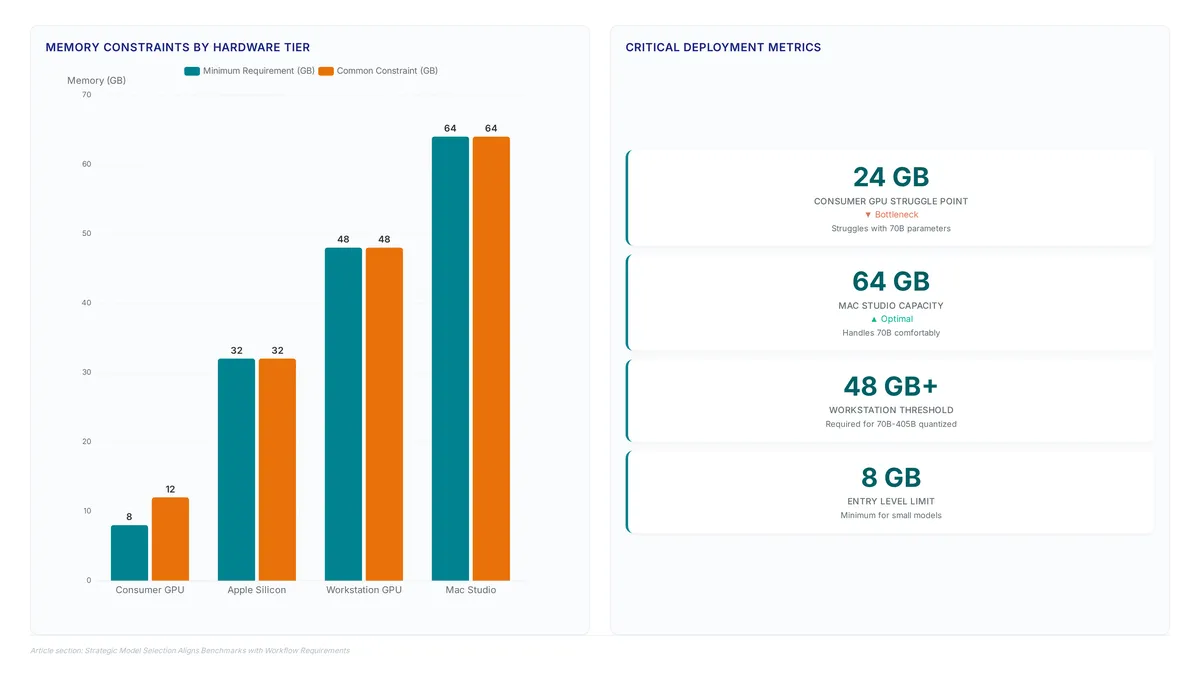
The open-source category further filters candidates by self-hosting viability, often mapping performance to specific hardware tiers like 8GB or 48GB memory constraints. Selecting a top-ranked model without checking these local limits leads to immediate deployment failure on standard workstations. Teams must cross-reference coding leaderboards with hardware-specific data to ensure the Ollama runtime can actually load the weights. Enterium solves this selection friction by aggregating these disjointed metrics into a single workflow, allowing engineers to match benchmark strengths directly to infrastructure constraints. Relying on a single aggregate score ignores the divergence between reasoning capability and execution reliability. The cost of this oversight is measured in wasted API spend on models that cannot handle the required tool use.
Mapping Self-Hosted Hardware Tiers to RTX GPUs and Macs
Hardware memory bandwidth dictates the maximum parameter count for local inference, creating hard ceilings on model selection. Apple Silicon unified memory allows larger models to run on Macs compared to discrete RTX GPUs with equivalent VRAM, as the system RAM acts as the model store. Operators matching hardware to workflow must prioritize quantization compatibility over raw peak FLOPS. A 24GB consumer GPU often struggles with 70B parameter models even at 4-bit quantization, while a Mac Studio with 64GB unified memory handles them comfortably.
| Hardware Tier | VRAM / Unified Memory | Max Parameters | Typical Use Case |
|---|---|---|---|
| Consumer RTX | a large number 24GB VRAM | 7B 34B Parameters | Singlefile completion |
| Apple Silicon | a large number 64GB Unified | 70B Parameters | Repositorywide context |
| Workstation | 48GB+ VRAM | 70B 405B quantized | Complex agentic flows |
The open-source category filters specifically for these hardware constraints, mapping available weights to compatible architectures. Selecting the best model for coding workflow requires cross-referencing LiveCodeBench scores against local latency budgets. High-quality reasoning models often demand context windows that exceed consumer VRAM limits, forcing a balance between intelligence and locality. Enterium provides the deployment architecture to automate this matching process, ensuring your pipeline selects models that fit within your specific memory bandwidth without manual trial and error. Relying on generic popularity metrics ignores the physical reality of token generation speeds on constrained hardware. The cost of failed local deployment is wasted engineering time debugging Ollama configuration errors rather than shipping features. Organizations should validate model fit against actual token throughput before committing to a self-hosted strategy.
Validating Workflow Fit Beyond Single Overall Scores
Start validation by isolating domain-specific benchmarks rather than accepting a generic quality index. Relying on a single overall score obscures critical weaknesses in reasoning or tool-use execution that define production reliability. Operators must examine coding, math, and agentic leaderboards separately to reveal these performance gaps. A model leading in general conversation often fails terminal tasks entirely, creating a dangerous mismatch for engineering teams. The coding leaderboard uses LiveCodeBench, Terminal-Bench, and SciCode to isolate syntax accuracy and tool-use execution. This separation prevents high-chat models from masking poor code generation capabilities. However, benchmark dominance in one domain does not guarantee latency efficiency in another. A model optimized for complex reasoning may introduce unacceptable delays in real-time chat applications. Teams should use the Compare page to analyze up to four models side-by-side for quality, pricing, and speed before committing. This granular approach ensures the selected architecture matches the specific workflow constraints. Enterium recommends validating these trade-offs against your actual latency budgets.
Deploying and Comparing Local LLMs via Ollama
Ollama's Local Runtime Architecture and Model Loading
Ollama enables low-friction local inference by loading quantized weights into VRAM, enabling GPUs with 8 GB of memory to execute models like Qwen3 8B. This architecture shifts the deployment constraint from network latency to local memory bandwidth. Unlike API providers where the same model varies in cost or speed across hosts, local execution offers performance bound by the specific capabilities of Macs, RTX GPUs, and workstations.
- Execute the model via CLI or connect applications to the local API endpoint.
Selecting the right local model requires reviewing open-source benchmarks rather than relying on general quality scores. A model leading in math reasoning may lack the instruction-following fidelity needed for chat workflows. Users should validate candidate models against specific latency budgets before integrating them into production pipelines.
Executing Local Benchmarks for Coding and Reasoning Tasks
Run specific benchmark suites like LiveCodeBench locally to validate model strength before deployment. Generic leaderboards often obscure performance variances in specialized domains like math or tool-use. Operators should execute these tests within their own hardware constraints to avoid latency surprises.
- Pull the target model using the Ollama CLI to load weights into VRAM.
- Compare results against the current coding leaderboard using LiveCodeBench, Terminal-Bench, and SciCode metrics.
| Benchmark Suite | Primary Domain | Local Constraint |
|---|---|---|
| LiveCodeBench | Code Generation | Memory bandwidth |
| Terminal-Bench | Tool Use | Context window |
| SciCode | Scientific Reasoning | Compute precision |
A model leading in quality may fail if the primary constraint is latency or cost. Self-hosting removes provider variability, offering top open-weight models for Ollama and low-cost API use. Users should validate these metrics against specific workflow requirements rather than relying on aggregate scores.
Pre-Deployment Validation Steps for Hardware Compatibility
Operators must match model quantization levels to available VRAM, as hardware tiers are mapped specifically for 8GB, 24GB, 64GB, and server-class hardware.
- Identify your hardware tier, distinguishing between Mac Unified Memory and discrete RTX architectures.
- Select a target model size that fits within the remaining VRAM budget to ensure token generation stability.
| Hardware Tier | Usable Memory | Max Recommended Model |
|---|---|---|
| Entry Laptop | 8 GB | 7B Quantized |
| Workstation | 48 GB | 70B Quantized |
| Server Class | High Memory | Unrestricted |
If the model looks promising, move to provider comparison before you commit to full infrastructure spend. Users should validate these constraints early to avoid wasted engineering cycles on incompatible hardware configurations.
About
Arjun Patel is an Applied LLM Engineer who specializes in benchmarking large language models for enterprise content workloads. His daily work involves rigorous, vendor-neutral evaluation of model performance across cost, latency, and output quality, making him uniquely qualified to dissect the complexities of side-by-side LLM comparisons. At Enterium, a B2B publication dedicated to scaling AI content pipelines, Arjun applies these same metrics to help technical marketers and content engineers architect reliable production systems. While tools exist to visualize model data across domains like code or creative writing, Arjun's focus remains on the practical trade-offs required to build reliable automation. He translates raw benchmark data into actionable insights for teams deciding which models fit their specific pipeline architecture. This article reflects Enterium's commitment to reproducible, practitioner-led analysis, moving beyond hype to provide the concrete data B2B leaders need to optimize their content operations effectively.
Conclusion
Raw benchmark scores often collapse when meeting rigid hardware memory walls. A model topping leaderboards may fail completely if its unquantized weights exceed your specific VRAM budget, turning a promising pilot into an idle resource drain. The operational cost here electricity, but the engineering time lost debugging latency spikes caused by improper memory mapping on consumer-grade GPUs. Teams must prioritize hardware-aware selection over aggregate performance metrics immediately.
Deployments should mandate a strict compatibility check where model quantization levels align precisely with available memory tiers before any production rollout. If your infrastructure relies on discrete 24GB cards, attempting to force 70B parameter models without aggressive quantization is a misuse of capital that guarantees instability. This approach ensures that token generation remains stable rather than crashing under memory pressure.
Start by running your target workload against LiveCodeBench on your actual hardware today to establish a realistic baseline for throughput. This immediate validation prevents costly over-provisioning and identifies the exact quantization point where performance degrades. By anchoring your strategy in empirical hardware constraints rather than theoretical peaks, you secure a sustainable path forward for integrating advanced reasoning capabilities into your workflow.
Frequently Asked Questions
High quality models often fail when latency constraints block necessary iterative communication. Deep reasoning chains expand token usage, risking hard limits on cheaper hosting tiers before completion.
Specific hardware tiers dictate maximum parameter sizes for stable local inference. While 24GB consumer GPUs struggle with large models, systems with 64GB unified memory handle them comfortably.
Provider reality means identical models exhibit divergent performance profiles across different hosting infrastructures. The same model can be cheap on one host and expensive on another entirely.
Agentic models execute multi-step tool chains autonomously rather than generating single-pass responses. This capability shifts workflow architecture from static prompting to iterative execution loops.
Deep reasoning chains increase accuracy but expand the context window significantly. Operators must verify context limits against data payloads to avoid truncation errors during complex tasks.
References