Content automation with n8n: Cut manual work 80%
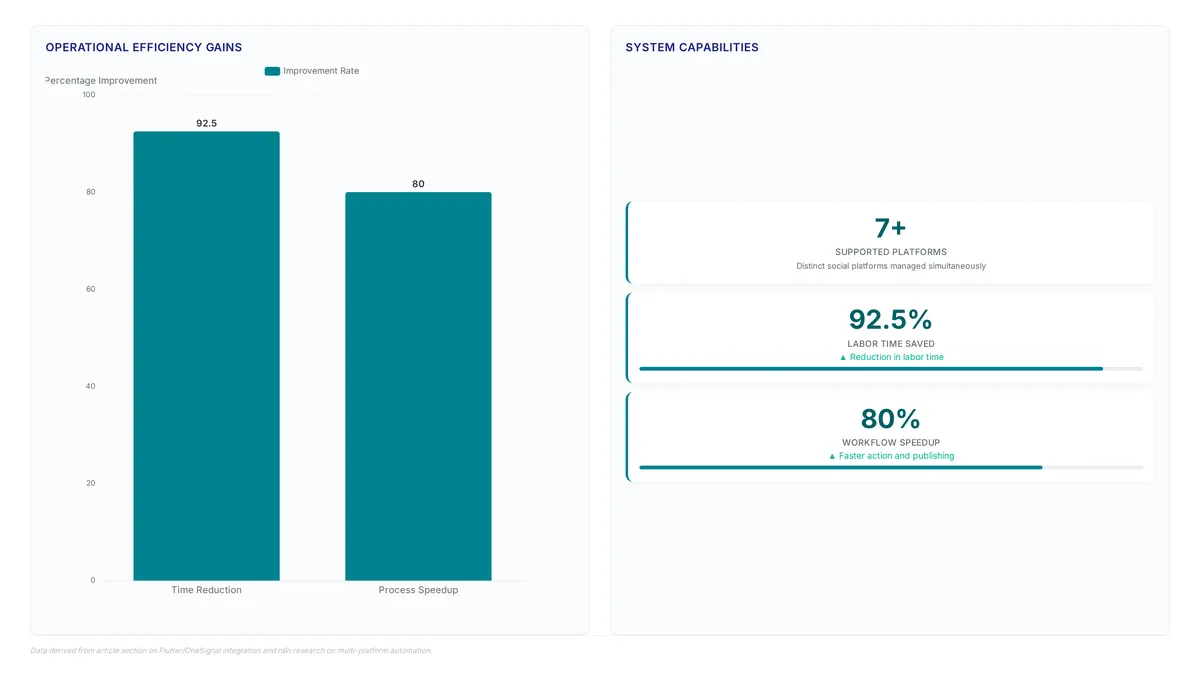
Automation can reduce manual content work by up to 80% through integrated AI generation and scheduling. You will examine the specific architecture connecting n8n and Supabase, the mechanics of an AI-powered publishing pipeline, and methods for linking local development tools to live webhooks.
The author, Musaddiq Ahmed Khan, explicitly rejects fully AI-generated posts in favor of a hybrid model that merges personal writing styles with algorithmic refinement. The described system ingests drafts and new articles, processes them through OpenAI, and tracks every state change within Supabase. This approach addresses the hectic nature of maintaining consistency across X, LinkedIn, and Facebook without sacrificing voice or control.
Critical to this design is the approval loop managed via a Flutter mobile application, where users validate content before it goes live. The infrastructure relies on Supabase triggers and functions to push status updates to OneSignal, ensuring immediate notification of pending items. The setup uses Ngrok to bridge the gap between local testing environments and public-facing webhook endpoints, solving the common inability to call localhost addresses from external services.
The Role of n8n and Supabase in Modern Content Automation
Defining n8n Workflow Automation and Supabase Backend Functions
Stop writing boilerplate code for logic that changes daily. n8n workflow automation acts as the visual orchestration layer, executing content ingestion without the overhead of traditional coding. Teams construct extensive workflows using a visual representation that lets operators trace data flow from intake to publication instantly. This clarity cuts the cognitive load required for complex conditional branching compared to code-first alternatives.
On the backend, Supabase trigger and function mechanisms provide the reactive infrastructure necessary for state management. When a database row updates, a set trigger invokes a stored function that executes a POST request to an external webhook. This pattern decouples data persistence from action execution, ensuring status changes reliably initiate downstream processes. The system fetches author posts and new articles, merging them into a single object before passing data to generative models.
| Component | Primary Role | Operational Value |
|---|---|---|
| n8n | Visual Orchestration | Reduces manual work in content production by up to 80% |
| Supabase | Event-Driven Backend | Enables real-time status tracking and webhook initiation |
| OpenAI | Content Generation | Regulates tone by processing merged author data objects |
The primary cost benefit identified in current automation literature is the ability to simplify workflows within existing budgets rather than requiring increased spend for higher output. Operators must ensure their local development environments expose public URLs via tools like Ngrok to receive these callback events during the testing phase, as Supabase cannot directly call a localhost address.
Applying n8n and Supabase for Multi-Platform Content Publishing
n8n content automation executes the orchestration logic required to ingest raw text and generate platform-specific variations without manual reformatting. Modern distribution systems analyze a single source asset to multiply output from one input unit, effectively scaling content distribution across distinct channels. The workflow uses Supabase triggers to detect database state changes, invoking functions that POST updates to the automation engine. This architecture supports simultaneous management of seven or more platforms, including X and LinkedIn, while maintaining strict brand consistency across all outputs.
| Component | Function | Integration Point |
|---|---|---|
| n8n | Workflow Orchestration | Visual node editor |
| Supabase | State & Events | Triggers and Functions |
| OpenAI | Content Regeneration | API text generation |
| OneSignal | Mobile Alerts | Real-time push |
Operators questioning if they should use n8n for automation must weigh visual debugging capabilities against the complexity of managing external webhooks. Ngrok is utilized to expose the local environment to the public internet, providing the temporary HTTPS URL required for Supabase to trigger the n8n workflow. While effective for development, this setup relies on the stability of the temporary URL provided by the tunneling service.
Risks of Manual Content Processes Versus Automated n8n Workflows
Manual publishing across X, LinkedIn, and Facebook creates a hectic process prone to inconsistent cadence and human error. The primary risk involves the inability to scale output without proportional increases in labor hours, leading to burnout or platform abandonment. Teams relying on manual entry face a direct trade-off between posting frequency and content quality, often sacrificing one for the other.
Automated workflows directly address this by streamlining drafting and repurposing phases to lower the cost-per-asset. By minimizing human hours spent on repetitive formatting, operators achieve significant efficiency gains applicable to content gathering. For instance, a documented case study of an AI agent automating a research workflow reduced a process time from 4 hours down to 18 minutes. This reduction demonstrates how automation enables teams to operate effectively within existing budgets rather than requiring increased spend.
| Process Type | Primary Bottleneck | Operational Risk |
|---|---|---|
| Manual Entry | Human Speed | Inconsistent cadence |
| Automated Flow | Initial Setup | Logic errors |
Conversely, automated pipelines allow volume to decouple from headcount. However, the shift requires rigorous logic validation upfront to prevent scaled errors. The concrete next step is auditing current posting latency to quantify the manual overhead before selecting a workflow engine.
Inside the Architecture of an AI-Powered Publishing Pipeline
Merging My Posts and My New Article Objects for OpenAI
Fetching 'My Posts' alongside 'My New Article' initiates the sequence by combining both into one unified object. This consolidated structure becomes the primary input for the OpenAI model, forcing the output to mimic the author's specific voice instead of generic AI patterns. Concatenating historical context with fresh restricts the generation scope before the system processes any tokens. The workflow updates the status on Supabase simultaneously while this merged object drives generation. Such a dual-write pattern guarantees the database state matches the exact payload sent to the LLM, creating an auditable link between input context and generated output.
Supabase Triggers Calling POST API to n8n Webhooks
A Supabase Function executes a POST call immediately upon database status updates to initiate the notification chain. This mechanism replaces polling intervals with event-driven precision, ensuring the mobile approval queue reflects the latest state without latency. The architecture relies on Triggers to detect row changes in the posts table, invoking a custom function that formats the payload for external consumption. Operators must address the connectivity gap between cloud database events and local development environments. Supabase cannot reach a localhost address directly, so the workflow requires a public tunnel to expose the local n8n instance.
Validating Approve and Reject Outcomes in Flutter
The Flutter interface resolves content status by executing distinct branching logic for approval or rejection outcomes. Selecting approve commits the generated text to linked social platforms immediately. This action finalizes the workflow state without requiring further AI intervention. Selecting reject triggers an automatic retry sequence where OpenAI regenerates the post based on updated parameters. The application then resubmits the new draft for human review, creating a closed feedback loop.
| Action | System Response | Next State |
|---|---|---|
| Approve | Publishes to platforms | Complete |
| Reject | Retries generation | Pending Review |
This binary validation prevents unverified content from reaching production feeds while maintaining high throughput. Infinite retry loops can occur if the model consistently fails to meet style constraints without human adjustment. Implementing a maximum retry count mitigates this risk effectively. Teams seeking to deploy similar validation architectures find that Enterium provides engineered solutions that harden these decision gates against logic errors. Every state transition must persist to the database before the UI updates.
Connecting Local Development Environments to Live Webhooks
Why Ngrok Exposes Localhost to Supabase Webhooks
Supabase cannot route HTTP requests to a private localhost address, requiring a public bridge for webhook delivery. The n8n instance listens on a port inaccessible to external clouds during local development, creating a connectivity gap. Ngrok resolves this by exposing the local host to the public internet and issuing a temporary HTTPS URL. This tunnel allows Supabase functions to successfully POST status updates to the local workflow trigger. The webhook listener remains unreachable without this intermediary, halting the automation pipeline before it begins.
Operators often underestimate the friction introduced by this topology shift. Integrating third-party software and managing multiple developer portals consumes significant debugging time even though the configuration appears trivial. The author notes that swapping between multiple tabs to find a single feature is "hectic," and spent hours debugging features to integrate third-party software. Careful attention during the local development loop becomes necessary. Validating these tunnel connections early helps avoid deployment failures. The following configuration illustrates the core mapping required to expose the local n8n port:
This setup ensures the HTTPS URL correctly forwards traffic to the local container.
Configuring Supabase POST Calls to Ngrok URLs
Private localhost addresses block HTTP requests from Supabase functions, demanding a public bridge for webhook delivery. An n8n instance listening on a local port creates a connectivity gap because external clouds cannot reach it. The automation pipeline halts before it begins if the webhook listener remains unreachable without this intermediary.
Engineering time disappears quickly when integrating third-party software and managing multiple developer portals despite the trivial appearance of the configuration. The author highlights that while the workflow "looks easy," it "isn't," requiring significant effort to manage multiple developer portals. Teams aiming to collect content requests efficiently must stabilize this link before scaling intake validation. To implement this connection reliably, the author utilized the following approach:
- Use Ngrok to generate a public HTTPS address for the localhost.
- Write a POST call within a Supabase Function.
- Configure the Supabase Function to target the temporary Ngrok URL. 5.
Temporary URLs rotate on restart, which may require updating the endpoint in the Supabase Function definition for each new session. Spending hours debugging features and managing multiple portals is a common challenge when integrating these systems according to the author.
Debugging Hours Lost to Third-Party Portal Swapping
Integrating disparate developer portals consumes hours debugging features instead of shipping content. Friction arises when operators swap between multiple tabs to locate a single configuration setting, a process documented as hectic in production environments. This fragmentation forces engineers to manually correlate logs across Supabase, n8n, and OneSignal interfaces without a unified view. Missing mobile notifications in OneSignal represent just one root cause obscured by the lack of centralized visibility, extending resolution windows notably.
- Identify the specific third-party software causing the handshake failure.
- Navigate between developer portals to locate necessary configuration settings.
- Validate webhook payloads against the expected schema before triggering downstream actions.
Maintaining mental maps for each service's distinct API behavior creates a hidden cognitive load. Automation tools promise efficiency by streamlining drafting and repurposing phases to lower cost-per-asset yet local development gaps reintroduce manual overhead. The author reports spending hours debugging features and managing multiple developer portals, noting that the process is far from simple. Realizing the full time-saving potential of the automation workflow requires addressing these connectivity and integration challenges.
Deploying Real-Time Approval Systems with Flutter and OneSignal
Supabase Triggers and POST Functions for Live Notification Data Flow
Database status changes activate Supabase Triggers that run Functions to dispatch POST requests instantly. Event-driven architecture removes the need for polling intervals so mobile devices receive approval requests the moment content generation finishes. A record update prompts the configured Function to call an external webhook and transmit payload data to the orchestration layer for immediate handling. This method standardizes request processes by validating fields before starting downstream actions like content workflow automation. The signal routes through n8n, which formats the message for OneSignal to push notifications to Flutter applications. Exposing local evolution environments to these triggers demands secure tunneling solutions like Ngrok, which adds complexity to the testing phase. Tracking state across multiple developer portals during debugging often creates integration errors. Engineers configure these database events to guarantee message delivery without manual steps. Strong implementations require careful handling of external API unavailability to keep workflows running.
Limitations appear when development speed conflicts with operational stability during connection management. Developers often spend hours debugging features while integrating third-party software across multiple portals. Complexity arises because Supabase cannot directly call a localhost webhook; the system needs a public HTTPS endpoint to bridge the gap during testing. Content remains stuck despite successful generation if a public URL is missing, preventing the notification chain from starting. The price of this modularity is the cognitive load needed to swap between tabs and find specific configuration features. Practitioners must make sure their webhook endpoints are accessible via public HTTPS URLs before enabling database triggers.
Building Flutter Content Approval Apps with OneSignal Integration
OneSignal integration routes Supabase Triggers through n8n webhooks to dispatch mobile alerts instantly. This architecture replaces inefficient polling with event-driven pushes, ensuring approvers receive notifications the moment database status changes. Workflow automation platforms reduce manual work in content production through tight AI and scheduling integration. Such patterns synchronize state between backend records and frontline mobile devices effectively.
Debugging Third-Party Integrations Across Multiple Developer Portals
The workflow looks easy, but friction from managing multiple developer portals makes it difficult. Engineers frequently spend hours debugging features when integrating disparate third-party softwares, often swapping between tabs to locate single configuration flags. This fragmentation obscures root causes in the n8n orchestration layer, where a single misconfiguration can alter the entire chain. Intelligent linking across these environments demands rigorous validation of every handshake point, unlike simple text generation. Achieving high efficiency requires navigating complex authentication schemas without visual aid. Rapid iteration conflicts with stable integration; the complexity of these systems often necessitates extensive troubleshooting when failures occur. Solutions addressing this fragmentation provide unified visibility into cross-platform data flows, eliminating the need to context-switch between disjointed dashboards. Troubleshooting phases become notably prolonged without a consolidated view of API interactions.
About
Arjun Patel is an Applied LLM Engineer who specializes in benchmarking LLM providers and RAG architectures for high-volume content workloads. His daily work involves rigorously evaluating inference economics, latency, and output quality across diverse models to build reliable, production-grade content pipelines. This technical background makes him uniquely qualified to dissect the complexities of automated content publishing workflows, moving beyond theoretical hype to practical implementation. While many practitioners experiment with general-purpose automation tools like n8n for social posting, Arjun's focus remains on the underlying LLM selection and pipeline architecture that ensures consistency and scale. At Enterium, a B2B publication dedicated to AI content automation, he translates these engineering challenges into vendor-neutral methodologies. His work guides content leaders in constructing systems where humans remain on the gates of quality, ensuring that automation serves strategic goals rather than just accelerating noise. Arjun's insights help teams navigate the trade-offs between cost and performance in real-world deployments.
Conclusion
Scaling event-driven publishing exposes a critical fragility: the cognitive load of managing disjointed developer portals often negates time savings gained from automation. While individual tasks accelerate, the operational cost of debugging cross-platform handshakes creates a hidden bottleneck that threatens reliability as volume increases. Organizations must prioritize unified visibility over modular complexity to sustain growth without proportional increases in engineering overhead.
Enterium recommends consolidating your orchestration layer immediately if your team spends more than 20% of their sprint cycle troubleshooting integration failures rather than building features. Do not wait for a substantial outage to address the fragmentation inherent in stitching together disparate third-party tools. The industry shift toward content repurposing in 2026 demands a reliable foundation where high-value assets flow smoothly without manual intervention or constant context switching.
Start this week by mapping every external handshake in your current workflow to identify single points of configuration failure. Document the specific tabs and portals your engineers must visit to resolve a single trigger error. This audit reveals the true friction points that Enterium's unified observability solutions are designed to eliminate, allowing you to replace fragile, multi-portal debugging with a single source of truth for your entire content pipeline.
Frequently Asked Questions
Automation can reduce manual content work by up to 80% through integrated AI. This massive efficiency gain allows teams to focus on strategy rather than repetitive formatting tasks across multiple social platforms daily.
Skipping approval risks publishing off-brand content since the author rejects fully AI-generated posts. The system requires a human to validate the merged object before it goes live to any connected social media accounts.
Supabase cannot call localhost addresses, so you must use a tool like Ngrok. This service exposes your local environment via a temporary HTTPS URL, allowing external database triggers to reach your development machine successfully.
A database update triggers a Supabase function that sends a POST request to n8n. This workflow immediately pushes a notification to your Flutter mobile app via OneSignal, alerting you to pending items.
Yes, the workflow analyzes a single source asset to multiply output from one input unit. It generates platform-specific variations for sites like LinkedIn and X while maintaining your specific personal writing style.
References