Content automation triggers that stop manual publishing
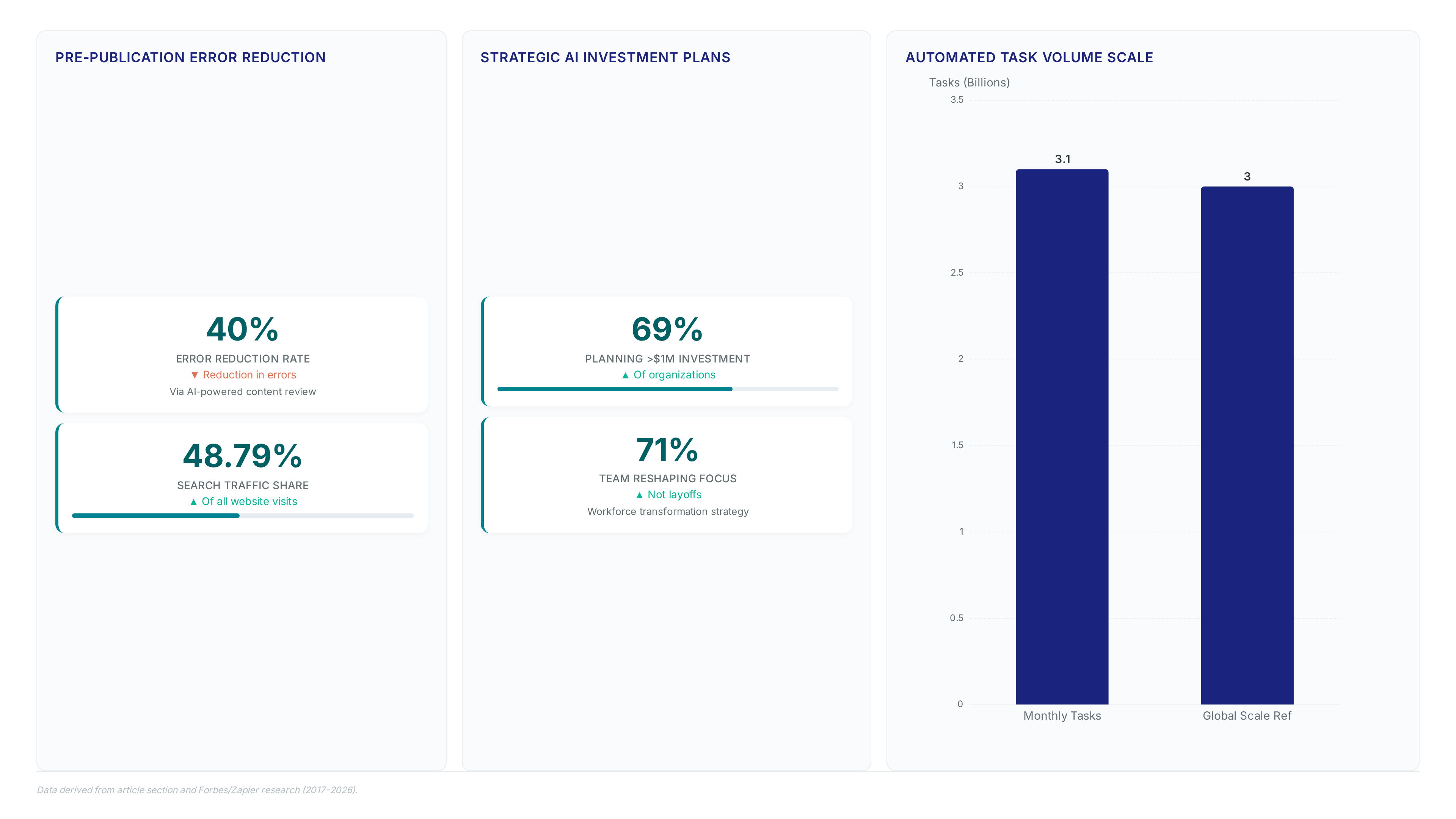
Zapier handles over billions of tasks monthly. That volume isn't an accident; it's proof that content automation is the only viable path for modern editorial teams. AI orchestration now connects over 9,000 applications, killing repetitive publishing duties while enforcing strict brand guidelines. We are looking at mechanics where automated scheduling lets CMS updates trigger instant social distribution without a human touching a keyboard. The real shift happens in automated review systems that link SEO tools directly to collaboration apps, turning quality assurance into a real-time background process.
Millions of businesses globally depend on this infrastructure. They aren't just syncing data; they are integrating content planning tools with existing databases to turn raw ideas into scheduled campaigns without manual hand-offs. Strategy replaces data entry. Teams react to trends instantly instead of chasing deadlines.
The Role of Content Automation in Modern Editorial Workflows
Defining Content Automation: From Workflow Triggers to AI Curation
Content automation manages creation, planning, scheduling, and review across channels without manual intervention. Basic sync operations simply copy data between apps. Advanced systems go further, employing AI-driven scoring to triage user submissions and flag policy violations before a human ever sees them. This distinction separates simple record-keeping from intelligent workflow management where triggers initiate complex, conditional logic paths.
Organizations deploy these architectures to eliminate repetitive data entry by using platforms that connect users to a library of over 9,000 applications for automation and AI orchestration to maintain editorial consistency. The mechanism functions by connecting CMS triggers to downstream actions; a new calendar entry can instantly queue social posts or route draft articles for automated review sharing. Basic tools handle linear tasks, yet strong platforms enable custom logic paths that branch workflows based on specific data conditions, allowing teams to manage complex publishing cadences. Automated drafting accelerates output, though maintaining quality at scale becomes challenging without integrated content curation automation. Effective deployment requires mapping every content state change to a specific action so high-volume channels do not become vectors for unverified information. Operators should audit current triggers to identify where manual hand-offs create bottlenecks or consistency gaps.
Real-World Content Creation Workflows: Auto-Syncing CMS Updates and Visual Publishing
Content Creation automations link CMS triggers to design tools so database updates instantly generate drafts. Users automate billions of tasks monthly across this connected app system to maintain velocity. A typical pipeline routes a new record in a headless CMS to an image generator, producing platform-optimized assets before publishing. This architecture reduces manual copying and folder setup while enforcing brand consistency across all platforms. Teams deploy auto visual content publishing to eliminate the lag between idea capture and public distribution.
Competitors often focus narrowly on text generation, but general-purpose orchestration layers connect content pipelines to CRMs and spreadsheets for richer context. Strong workflows apply retry logic and alerting mechanisms to manage API timeouts effectively. Operators must decide between simple linear flows and conditional branches that handle exceptions. Starting with automated content distribution for low-risk channels allows teams to validate the integrity of source data before scaling to primary revenue drivers. This approach isolates failure domains and ensures reliability before high-visibility publication.
- Connect CMS webhooks to design software triggers
- Generate visual assets using AI templates
- Route drafts to Slack for human approval
- Publish approved content to social platforms automatically
Automation increases existing workflow defects as efficiently as it accelerates valid processes.
Validating Your Editorial Pipeline: A Checklist for Audit-Ready Moderation and Sync
Content Curation automations triage submissions without manual copying or repetitive checks. Zapier routes applications through predefined rules to flag policy violations immediately. This mechanism preserves audit trails by logging scores directly in a moderation queue.
| Feature | Manual Process | Automated Sync |
|---|---|---|
| Data Entry | High error rate | Zero copy-paste |
| Policy Check | Post-publication | Pre-flight AI |
| Latency | Hours | Seconds |
Operators must verify that CRM-to-CMS Sync eliminates data silos between sales and editorial databases. Implementing custom logic paths ensures conditional sequences handle complex approval hierarchies accurately. The operational cost involves managing task volume against billing thresholds. Free tiers support limited monthly tasks, with paid plans offering expanded capacity for expanding automation needs. These systems require explicit error handling for API timeouts unlike simple triggers. Validation requires checking that auto-sync CMS updates preserve metadata during transfer. Running regular verification checks helps maintain end-to-end integrity and catches configuration drift before it impacts live content streams.
Inside AI-Powered Content Scheduling and Planning Mechanics
How CMS Triggers and Calendar Entries Initiate AI Scheduling
New calendar entries and CMS updates function as immediate event triggers that queue content without manual intervention. Content Scheduling automations apply Zapier to link these specific database states directly to social platforms, ensuring posts publish exactly when required. This architecture removes the latency between a deadline appearing on a calendar and the corresponding distribution action.
- A new entry is created in a connected calendar application.
- The automation engine detects the timestamp and retrieves associated metadata.
- Content is drafted, scheduled, or published to target channels instantly.
Organizations use these workflows to orchestrate planning and review across channels, maintaining accurate editorial calendars at scale. Basic sync tools copy data fields, yet this approach executes conditional logic based on time-sensitive events. Triggers like new calendar entries or CMS updates instantly queue or publish content without manual effort, keeping social feeds active and aligned with campaign timelines.
| Trigger Source | Action Type | Latency |
|---|---|---|
| Calendar Entry | Queue Post | Seconds |
| CMS Update | Publish | Seconds |
| Form Submit | Draft Content | Real-time |
State-based reactivity replaces rigid time-based execution models. Auto-syncing guidelines and schedules across all platforms helps keep tone, branding, and timing uniform.
Turning Deadlines into Multi-Channel Campaigns via Database Connections
Database row inserts function as the primary trigger for content planning workflows that span multiple channels. Zapier monitors specific tables for new deadlines, then executes a chain where a form submission creates a calendar event and simultaneously queues a social draft. This architecture removes the manual hand-off between idea capture and schedule enforcement.
- A stakeholder submits a campaign brief via a connected form interface.
- The automation engine writes the deadline to the database and triggers a calendar entry.
- Associated assets are drafted in the CMS and linked to the scheduled slot.
Teams gain a consistent publishing cadence while freeing time for strategy and creativity. Zapier content planning automations turn ideas and deadlines into scheduled, multi-channel campaigns by connecting forms, databases, calendars, and social platforms. Narrow generators lack this orchestration layer, which connects disparate tools like CRMs and spreadsheets to maintain a single source of truth while eliminating manual data entry.
| Component | Manual Execution | Automated Pipeline |
|---|---|---|
| Trigger Source | Email/Chat | Database Insert |
| State Sync | Manual Copy | Real-time Write |
| Failure Mode | Missed Deadline | Manual Data Entry |
Operators rely on the system to auto-create, update, and sync records so every idea, asset, or post instantly appears in the right CMS, database, or collaboration tool. Manual copying, folder setup, and status tracking disappear, keeping teams focused on creativity instead of busywork. From idea capture to final publish, every step happens quicker, more consistently, and at scale.
Validating Automated Social Posting and Content Calendar Syncs
Validation begins by confirming that CMS status changes trigger immediate queue entries in the orchestration layer. Teams must verify that calendar entries initiate drafts without manual hand-offs to maintain cadence. A failure here creates silent gaps where deadlines pass without associated distribution tasks.
- Inspect the trigger history for new calendar events to ensure instant detection.
- Verify that policy violations are flagged before content reaches the publishing queue.
- Confirm that successful runs log scores in a central database for audit readiness.
| Validation Step | Manual Risk | Automated Benefit |
|---|---|---|
| Trigger Check | Missed deadlines | Instant queuing |
| Policy Gate | Post-post errors | Pre-flight filtering |
| Audit Log | Fragmented records | Centralized scoring |
Connecting forms to databases requires strict schema mapping to prevent data corruption during sync. While a majority of leaders anticipate AI reshaping teams through redeployment, improper validation forces staff to revert to manual checks. Teams gain a consistent publishing cadence while freeing time for strategy and creativity only when these gates hold. Regular testing of trigger paths ensures the content planning engine respects all set constraints.
Automated Content Review Processes for SEO and Brand Consistency
AI-Powered Content Review: Automating QA and SEO Checks
Triggers from a CMS launch immediate checks for factual correctness and tone. Specific automation examples include Web Content Capture, Automate blog QA & SEO, and Automated review sharing. New blog posts undergo these automated QA checks before publication to maintain brand consistency across channels.
| Component | Function |
|---|---|
| Trigger | New CMS draft or update |
| Action | LLM analysis for SEO and facts |
| Result | Feedback loop in editor |
Workflows flag policy violations and route feedback directly into editing tools. Non-compliant content never reaches the public-facing interface because systems fix issues before publishing updates automatically.
Executing Automated Blog QA and SEO Validation Workflows
Drafts in a CMS trigger instant large-language-model analysis to validate factual accuracy and search optimization. Systems intercept content creation events and route text through AI validators that check tone and SEO best practices against set policies. This architecture captures organic search traffic by preventing substandard posts from reaching the live index.
- A writer saves a draft, initiating a trigger in the orchestration layer.
- The system executes logic paths to branch workflows based on content type or author seniority.
- Detected violations generate tickets in collaboration apps while suggesting optimizations.
| Validation Gate | Manual Risk | Automated Action |
|---|---|---|
| SEO Schema | Missing metadata | Auto-inject tags |
| Factual Claims | Hallucinated data | Flag for review |
| Brand Tone | Inconsistent voice | Suggest edits |
Automation acts as a general-purpose orchestration layer connecting disparate quality tools. Successful deployment requires balancing strict policy violations that flag content with flexible suggestion modes for minor stylistic tweaks.
Pre-Publication Checklist: Verifying Tone, Facts, and Metrics
Validate tone consistency and factual accuracy before any content reaches the live index. Systems use pre-flight gates to flag content if large-language-model analysis detects deviations from brand guidelines or SEO baselines.
- Verify CMS triggers initiate immediate review workflows upon draft creation.
- Confirm policy violations generate actionable errors rather than passive warnings.
- Audit review logs to ensure every asset passed factual verification.
| Check Type | Failure Mode | Remediation Action |
|---|---|---|
| Tone Analysis | Deviation from voice | Route to human editor |
| Fact Validation | Hallucinated data | Block publish, flag source |
| SEO Metrics | Missing keywords | Auto-suggest optimization |
Organizations use automation platforms to maintain quality control at scale while orchestrating creation across channels. Pages stay accurate, optimized for search, and up to date without manual chasing. Speed conflicts with rigor; delaying publication for deep analysis hurts agility, yet skipping checks risks brand integrity. Users often bind the publish action strictly to a successful review token.
Building End-to-End Content Automation Pipelines with Zapier
Defining End-to-End Content Automation Pipelines in Zapier
Production pipelines on Zapier link CMS triggers directly to design suites and communication hubs, removing the need for manual data entry across the entire stack. New database updates or idea submissions instantly generate drafts without human copying because this architecture handles the heavy lifting. Organizations depend on this orchestration layer since it links over 9,000 applications to maintain flow between disparate systems. Competitors often focus narrowly on generation, yet this approach integrates CRM-to-CMS sync to keep records accurate automatically. The company projects annual revenue to exceed $300 million in 2026.1.
- Configure a trigger where a new calendar entry initiates a draft in the content management system.
- Route the draft through AI validation to flag guideline violations before reaching the editing queue.
- Log every moderation score in a central database to ensure audit readiness for compliance teams.
Forms, databases, calendars, and social platforms connect so posts get drafted, approved, and published without manual hand-offs. This system handles complex state management for collaborative workflow management unlike simple schedulers. Operators should define explicit failure paths rather than assuming success. Paid plans allow users to include up to 100 actions within a single workflow, notably expanding complexity limits compared to lower tiers.
Implementing CRM-to-CMS Sync and Auto-Sync CMS Updates
Zapier auto-creates, updates, and syncs records so every idea, asset, or post instantly appears in the right CMS, database, or collaboration tool. Latency between sales activity and content visibility disappears, ensuring marketing teams react to client data in real-time rather than waiting for weekly exports. Routing form submissions directly to Salesforce triggers immediate Slack notifications and schedules follow-up tasks without human intervention.
- Configure a CRM trigger to detect new or updated lead records.
- Map specific fields like "Industry" and "Pain Point" to CMS draft variables.
- Set rules to publish immediately or queue for review based on lead score.
| Sync Direction | Trigger Event | Latency Impact |
|---|---|---|
| CRM to CMS | New Lead Created | Instant Draft |
| CMS to CRM | Article Published | Update Status |
| Bidirectional | Field Modification | Requires Careful Configuration |
This orchestration layer connects content repositories to operational databases unlike narrow generation tools, ensuring editorial calendars reflect actual business momentum. Teams gain a consistent publishing cadence while freeing time for strategy and creativity through these content planning automations. The platform distinguishes itself by supporting over 9,000 app integrations, a scale that competitors struggle to match in breadth.
Pipeline Validation Checklist for Multi-Channel Distribution Loops
Verify trigger fidelity by confirming form submissions route to databases before social dispatch occurs. Operators must test that database entries generate publish events across all connected channels to prevent duplicate posts.
- Inspect task history logs to ensure every trigger executes without throttling delays.
- Validate field mapping so CRM data populates social captions accurately.
- Confirm error handlers notify teams via Slack when API limits halt distribution.
Latency represents the hidden cost of complex loops; adding AI review steps delays time-sensitive announcements by minutes that matter during breaking news cycles. Teams should prioritize speed for urgent alerts while reserving deep validation for evergreen assets. This tension requires splitting pipelines into fast-path and slow-path tiers rather than forcing one policy on all content. Organizations connecting forms to Salesforce often miss that immediate Slack notifications can overwhelm channels if volume spikes unexpectedly. The platform uses a task-based billing model rather than a credit-based system, allowing specific actions to count directly toward limits.
About
Sofia Marchetti is a B2B Content Strategist specializing in how automated systems drive demand generation and topical authority. With over a decade of experience in B2B SaaS, she is uniquely qualified to dissect content automation because she designs the very pipelines this article analyzes. Her daily work involves architecting workflows where AI assists in drafting and scheduling without sacrificing editorial rigor, directly mirroring the Zapier-driven processes discussed here. At Enterium, a brand dedicated to documenting how modern teams scale content with LLMs, Sofia bridges the gap between theoretical strategy and production reality. She does not merely observe these tools; she implements the "research → generate → QA → publish" methodology that ensures consistent output and data-driven decisions. This piece reflects her practitioner-led approach, offering concrete steps for marketing operations leaders who need to eliminate repetitive tasks while maintaining quality control at scale.
Conclusion
Scaling content automation reveals that latency becomes the primary bottleneck when AI review steps delay time-sensitive announcements. While the platform supports over 9,000 app integrations, complex loops often create hidden operational costs where urgent alerts lose relevance before publication. Organizations must stop forcing a single policy on all assets and instead architect distinct fast-path and slow-path tiers. This separation ensures breaking news bypasses deep validation queues while evergreen content retains rigorous safety checks. Without this structural split, high-volume triggers will inevitably overwhelm communication channels like Slack, turning a productivity tool into a source of noise.
Teams should immediately implement a dual-tier pipeline strategy before the next substantial product launch or news cycle. Do not wait for a crisis to reveal that your error handlers cannot distinguish between a routine update and a critical alert. Start this week by auditing your current task history logs to identify any triggers that executed with throttling delays. Configure a specific test where a form submission routes to a database without passing through the full AI review chain, verifying that the trigger fidelity remains intact while reducing execution time. This targeted adjustment secures the speed required for real-time engagement without sacrificing the governance needed for brand safety.
Frequently Asked Questions
Scaling unvalidated flows multiplies existing workflow defects efficiently. Operators must isolate failure domains before scaling to primary revenue drivers because users automate over 3.1 billion tasks monthly across the connected app ecosystem.
More than 3 million businesses globally depend on this infrastructure to manage their output effectively. This widespread trust indicates that manual workflows are now an obsolete strategy that sacrifices agility for false control.
Yes, advanced systems employ AI-driven scoring to flag policy violations before human review occurs. This pre-flight check ensures high-volume channels do not become vectors for unverified information while maintaining strict brand guidelines.
Linear flows often fail to handle exceptions compared to custom logic paths that branch based on data. Teams should start with low-risk channels to validate source data integrity before scaling to avoid compounding errors.
Automated sync reduces latency from hours down to mere seconds for immediate distribution. This speed allows teams to react to trends instantly rather than chasing deadlines while keeping editorial calendars accurate and aligned.
References