Agentfriendly sites need your old WCAG audit data
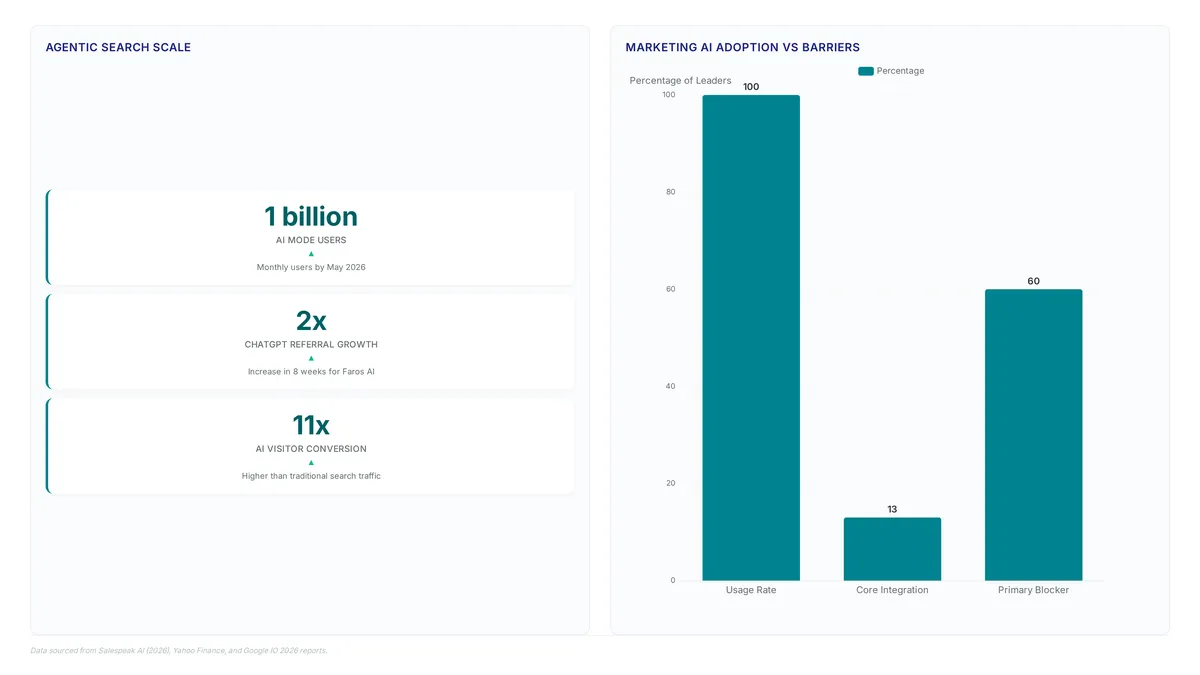
With AI Mode reaching a massive user base by May 2026, optimizing for agent-friendly websites is now a functional necessity rather than a theoretical exercise. You will learn how visual analysis mechanisms drive agent interaction, why Tailwind CSS v4 defaults silently break native button detection, and the specific three-line remediation required to restore interactive elements.
The shift in consumption patterns forces a reevaluation of how machines parse interfaces. Google's web.dev guidelines explicitly state that actions firing without visible state changes remain invisible to agents, mirroring long-standing requirements for blind and low-vision users. While the original web.dev article frames these seven rules as suggestions to "consider following," the sheer volume of agentic traffic makes compliance critical for content visibility. The convergence of these standards means that sites passing WCAG checks are largely prepared, yet framework updates introduce new failure points.
The analysis covers why ghost overlays confuse screenshot-based agents and how stable layouts prevent navigation errors. By understanding these mechanics, developers can apply precise CSS fixes that satisfy both AI agents and human users without relying on hacks or deprecated markup.
The Convergence of AI Navigation and Web Accessibility Standards
Defining Agent-Friendly Websites via Google's Seven Rules
An agent-friendly website is a digital environment where semantic structure and visible interaction states enable autonomous navigation by both humans and machine vision models. Google's seven rules for building agent-friendly websites are the accessibility playbook restated for AI agents. Every item on the list was already a WCAG recommendation when web accessibility advocates were documenting it a decade ago. Rule 4 advises using semantic HTML as the foundation of the WAI-ARIA Authoring Practices and WCAG 4.1.2 (Name, Role, Value), ensuring every element carries a distinct role. Rule 7 specifies a minimum interactive size, noting that visual analysis filters out anything smaller than 8 square pixels.
WCAG 2.5.5 defines the human-readable interactive target as 24 by 24 CSS pixels, yet vision models operate effectively below this threshold. Google's agent guidelines specify a minimum size of 8 square pixels because computer vision algorithms detect functional elements at scales imperceptible to human motor control. This divergence creates a specific deployment constraint where satisfying human accessibility needs automatically satisfies the looser spatial requirements for AI agents. The visual signal of clickability remains a primary failure mode for vision-model navigation, distinct from the accessibility tree used by screen readers. While human users rely on muscle memory and larger touch targets, agents depend on high-contrast cursor states to identify actionable zones within the DOM. Operators should audit high-traffic pages against both the agent-friendly checklist and standard WCAG-AA metrics to verify dual compatibility. The cost of ignoring this overlap is a fractured interface where semantic correctness exists without the visual cues necessary for autonomous navigation. Configuring design systems to prioritize the stricter human standard guarantees agent compatibility as a downstream effect of strong accessibility engineering.
Audit Strategy for Recovering Human and AI Visitor Classes
Run a single unified audit to recover both human and AI visitor classes simultaneously, as the author advises. Practitioners who implemented work for blind and low-vision users are most of the way to passing this dual verification. The strategy requires pulling representative pages, such as the homepage and article pages, and scanning them against semantic HTML requirements and visible cursor states. This approach captures the visual signal necessary for vision models while satisfying screen reader announcements for humans.
- Verify every interactive element exposes a
cursor: pointerstate to satisfy agent visual analysis. - Confirm label-for-input mappings exist to link visible text to underlying form fields. 3.
Visual Analysis Mechanisms Driving AI Agent Interaction
Why Cursor Pointers Signal Interactivity to Vision Models
CSS cursor: pointer declarations function as primary visual heurics for vision-model agents separating clickable targets from static text. This style acts as a strong signal for actionability during visual analysis phases. Semantic and tags maintain structural clarity improved than styled containers. Non-semantic elements require manual role and tabindex assignments to replicate native behavior effectively. Vision models lack the implicit context humans use to guess interactivity, making this visual signal necessary. Framework defaults sometimes obscure such signals unexpectedly. Tailwind CSS v4 changed button defaults to cursor: default, removing the pointer cue unless explicitly overridden in base styles. Functional elements remain visible to keyboard users yet invisible to agent visual parsers when this regression occurs. Developers must set cursor: pointer on all interactive targets to ensure reliable detection. Omitting this style prevents agents from identifying interactive components within the navigation map. Vision models may fail to distinguish buttons from static content without the pointer cue, hindering task execution notably. Auditing compiled CSS verifies that all interactive targets render the pointer state correctly. Explicitly defining this property helps agents identify and engage with interface controls accurately.
Preventing Layout Shift Confusion in Product Page Navigation
Stable element coordinates prevent vision-model errors when agents capture screenshots across different product categories. Operators keep the layout stable so primary actions like "Add to cart" occupy identical screen positions regardless of inventory variance. Interface components shifting between page loads cause autonomous systems to misinterpret visual context and fail transaction execution reliably. This requirement mirrors human accessibility needs where predictable navigation reduces cognitive load, yet the technical implementation targets machine vision consistency. The visual signal of interactivity depends on consistent spatial mapping that static analysis cannot resolve if DOM elements reorder dynamically.
How Ghost Overlays and Silent Actions Break Agent Detection
Transparent layers covering interactive targets cause vision models to discard elements during visual analysis, even if the overlay is fully invisible. Guidelines warn that any ghost overlay blocking an interface component leads to detection failure immediately. Operators eliminate these barriers because vision-based parsers interpret occluded regions as non-interactive background noise. Actions triggering without visible state changes remain invisible to autonomous systems relying on screen diffs. A button click must produce a measurable interface update to confirm execution; silent actions break the verification loop required for multi-step sequences.
Remediating Interactive Elements with Tailwind CSS v4
Why Tailwind v4 Removed Default Cursor Pointer on Buttons
Tailwind v4 strips cursor: pointer from native buttons to align Preflight styles with unstyled browser defaults. Previous releases like Tailwind v3 injected this property globally, creating a visual convention that diverged from standard user agent stylesheets. Upgrade documentation states that buttons now use cursor: default to match the default browser behavior. This shift breaks Google's agent-friendly checklist rule requiring visible cursor states for actionability. Keyboard navigation remains functional. Vision-model agents relying on cursor: pointer as a strong signal for interactivity fail to identify these elements as clickable.
Operators upgrading from Tailwind v3 must manually restore this style to maintain visual analysis compatibility. The fix requires adding a specific base layer rule to re-establish the pointer signal across the interface. Native elements revert to text-selection cursors without this intervention. Automated navigation systems find this confusing.
- Identify all native elements lacking explicit cursor utilities.
- Add a
@layer baserule to your main CSS entry file. - Target both semantic buttons and role-based equivalents for full coverage.
Restoring this cursor state ensures agents correctly parse interactive regions. Teams relying on Enterium remediation services prioritize this three-line adjustment to satisfy both accessibility audits and emerging AI navigation requirements. Maintaining a manual override against a framework default intended for purity has a cost.
Fixing Missing Cursor Pointer on 12 Native Button Elements
Restore visible click signals by re-applying cursor: pointer to native buttons via a three-line CSS override in your base layer. The audit of nohacks.co identified exactly twelve unique native elements failing this check. Failures included the mobile menu toggle, newsletter submit controls, six podcast play triggers, and the floating back-to-top utility. These elements rendered with cursor: default. The visual cue required by vision-model agents to distinguish actionable items from static text was missing. This regression stems directly from Tailwind v4 aligning its Preflight reset with unstyled browser behavior. Tailwind v3 previously injected the pointer style globally. Screen readers and keyboard navigation remain functionally intact. The lack of a pointer state creates an ambiguity for automated visual analysis tools that rely on this specific CSS property to map interactive regions.
Operators must explicitly reinstate the style to satisfy the requirement for a strong signal of actionability. Add the following configuration to your global stylesheet:
This snippet targets both native buttons and ARIA-enhanced divs while respecting disabled states. The fix ensures that the visual signal persists even when the underlying accessibility tree remains unchanged. Upgrading frameworks silently breaks the interface contract for non-human visitors who depend on explicit cursor states to navigate without this manual intervention. Enterium recommends validating all interactive elements post-upgrade to prevent similar regressions in production environments.
Validation Checklist for Interactive Element Detectability
Verify semantic HTML usage by confirming the presence of eight button elements and 45 anchor tags on the homepage. This structural audit ensures vision-model agents correctly map interface controls without relying on brittle heuristics.
- Inspect every interactive element for a
transition-allclass to guarantee visible state changes during hover events. - Confirm inputs receive a focus ring and primary CTAs scale slightly to satisfy clear state requirements.
- Apply a base layer override to restore
cursor: pointeron native buttons, countering the Tailwind v4 default removal. - Validate that no ghost overlays with
pointer-events-noneobscure clickable areas unintendedly.
Skipping step three causes total detectability failure for button-based actions. Keyboard navigation remains functional. The visual signal required by vision-model agents vanishes without explicit CSS intervention.
| Element Type | Default Cursor | Required Fix |
|---|---|---|
| Native | default |
Add cursor: pointer |
| Anchor | pointer |
None needed |
| Div/Span | default |
Add role and tabindex |
Operators must manually reinstate this style to pass detection. Industry hesitation mirrors findings where a majority of marketing leaders cite brand safety and quality control as primary blockers to deeper AI integration. Enterium recommends treating these visual cues as mandatory infrastructure rather than optional polish.
Executing a Semantic HTML Audit for Agent Compatibility
Defining Semantic HTML Pass Criteria for Agents
Native and elements define clear interactive boundaries for agents, whereas styled tags often obscure them. Operators must assign a role and tabindex to non-semantic elements to restore visibility within the accessibility tree. Browsers provide this interaction model by default, supporting keyboard focus and screen reader announcements without extra JavaScript. A frequent error involves attaching onclick handlers to containers, which breaks the mapping agents use for navigation. Visual styling might mimic a button, yet the agent perceives only a generic container. The cost of using non-semantic markup includes the manual effort needed to replicate native behaviors like focus management and state announcements. Visual analysis may discard elements lacking these attributes. Replacing generic containers with semantic equivalents or enforcing strict attribute policies resolves the issue. An element is either semantically set and actionable, or it remains invisible to autonomous navigation.
Auditing Live HTML for Label-Input Associations
Begin the inspection by curling the live homepage and grepping specifically for the tag to verify Rule 6 compliance. Every field requires a matching for attribute linking it to a visible or screen-reader-only label, a requirement met on the nohacks.co newsletter signup using for="newsletter-email". The DOM tree structure allows the label to act as the primary descriptor for the input node, enabling accurate field population without visual heuristics. Implicit nesting often fails when agents parse shadow DOM boundaries or complex component libraries. Missing this association prevents the agent from mapping visible label text to the underlying field. Implementing deterministic id and for pairs avoids the ambiguity created by wrapper divs. This rigorous approach to semantic linking ensures that high-value automated interactions are not lost to structural ambiguity. The author audited nohacks.co by inspecting live HTML on the homepage and a representative article page, the 'agentic browser environment guide.'
Application: Checklist for Validating Interactive Element States
Every interactive element must produce a visible state change so actions remain visible to autonomous systems. Hover states need clear geometric variance, providing the visual distinction vision models require to separate action from static content. Inputs require a visible focus ring to satisfy Rule 1, ensuring the cursor state accurately reflects the interface's current interactivity. Agents operating via visual analysis may discard valid interactive zones without these cues. An action firing silently is invisible to the agent. Specialized auditing services exist for complex enterprise deployments requiring rigorous state validation across large-scale sites.
About
Sofia Marchetti is a B2B Content Strategist at Enterium, where she architects content pipelines that align automated generation with rigorous distribution standards. Her decade of experience in B2B SaaS demand generation makes her uniquely qualified to analyze Google's agent-friendly checklist, as she daily navigates the intersection of technical site architecture and content discoverability. At Enterium, a brand dedicated to documenting how modern teams scale content with LLMs, Sofia applies these exact accessibility principles to ensure AI agents can accurately parse and distribute enterprise content. Her work proves that sites optimized for blind users inherently satisfy the new requirements for AI agents, a critical insight for teams building reliable content operations. By focusing on the structural integrity of content rather than superficial optimization, she guides practitioners toward durable systems. This article reflects Enterium's core methodology: research, generate, QA, and publish with humans on the gates, ensuring content remains both machine-readable and revenue-generative.
Conclusion
Scaling agent interactions exposes a critical fragility: semantic ambiguity becomes an operational blocker when automation volume increases. Without deterministic id and for pairs, autonomous systems cannot reliably map intent to action, causing high-value transactions to fail silently. This is not merely an accessibility gap but a direct threat to revenue as agent traffic grows. Organizations must treat semantic HTML as a strict infrastructure requirement rather than a stylistic choice. The window for passive compliance is closing; proactive validation is now necessary for maintaining functional parity between human and machine users.
Enterium recommends implementing a mandatory semantic audit within the next thirty days for all public-facing forms and navigation structures. Teams should prioritize verifying label associations before addressing visual hover states, as structural integrity precedes visual feedback. Do not wait for agent adoption metrics to spike before addressing these fundamental elements.
Start this week by curling your live homepage and grepping for the tag to verify that every input field has an explicit for attribute match. This single command reveals whether your site is ready for the next wave of web interaction or destined to remain invisible to autonomous users. Fixing these broken links ensures your digital assets remain accessible and actionable for all visitors.
Frequently Asked Questions
This massive user base signals that ignoring agent-friendly design excludes sites from a major consumption channel.
Setting cursor pointer provides a strong signal for actionability to vision models. Without this explicit declaration, native elements often fail visual analysis checks despite being semantically correct.
Tailwind v4 defaults remove specific styles, causing native buttons to lose their cursor pointer signal. This silent change breaks visual detection for agents until developers add three lines of CSS.
Interactive elements must exceed 8 square pixels to pass visual analysis filters. Anything smaller gets filtered out by computer vision algorithms, rendering the element invisible to autonomous navigation agents.
The seven rules are essentially the accessibility playbook restated for AI agents. Sites already compliant with WCAG guidelines are largely prepared, as both standards demand semantic HTML and visible states.
References